How to know which AI ideas are worth building
Most AI demos online stop at asking ChatGPT or Claude to do something. In a business, the AI model is only one part of the system. In this edition we will map the parts that sit around it, then use that understanding to work out which AI ideas are actually worth building.
On this page (19)
- Systems, Systems, Systems
- What makes up an AI Agent system?
- Trigger / Interface
- Application and workflow logic
- AI model or the Brain
- Context, Knowledge and Data
- Integrations and tools
- Security, permissions and guardrails
- Logging, testing and monitoring
- How to choose what to build
- 1. Find expensive work
- 2. Define the problem and the use case
- 3. Check if you can actually build it
- 4. Work out if it is worth doing
- 5. Expose the risk
- 6. Validate the biggest assumptions
- Why we chose the keep-in-touch agent as the learning project
- What you go do now
- Whats happened this week
Last week we covered your role as the AI Champion. Your main job is to select and direct the work involved in getting AI used where it creates value. Being able to build stuff is optional, although for me that is where the fun is.
Today we go one level deeper.
Systems, Systems, Systems
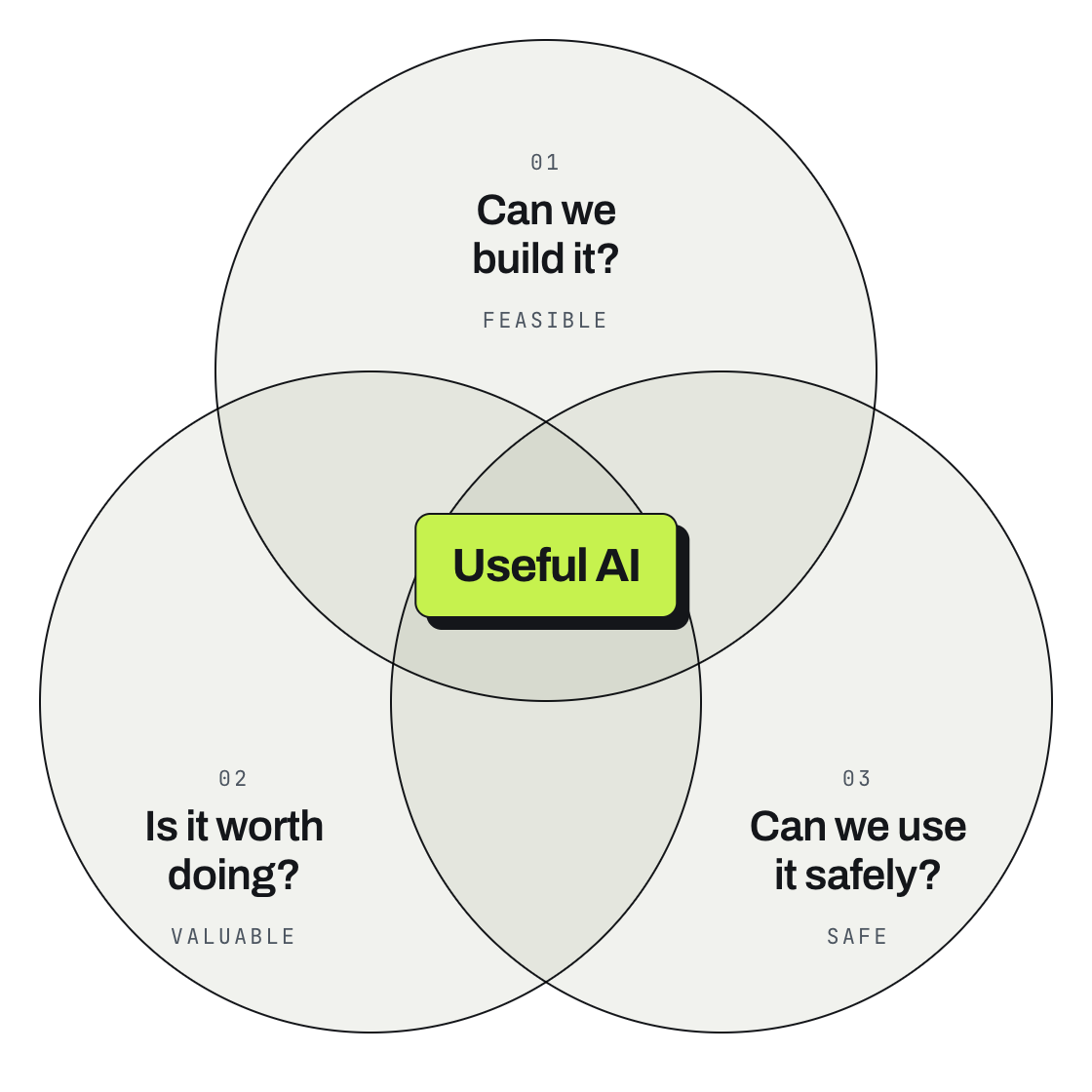
To decide which AI ideas should move forward, you need enough understanding of an AI system to ask three questions:
can we build it,
is it worth doing and
can we use it safely?
In this and the next few editions we are going to use a simple keep-in-touch agent. Its job is to help maintain valuable relationships before they go cold.
It reviews contacts and recent conversations, searches for something timely and relevant to make contact about, identifies who may need a follow-up, brings the context together and drafts a message for approval. You can start with ChatGPT, Claude or Copilot and a spreadsheet, then connect it to a CRM, email or calendar as the solution becomes more useful.
For example, I prompt:
“I want to maintain my network relationships. I need a relatable reason to contact people who I haven't in a while. Please draft me the messages to send.”
Sounds simple. For the keep-in-touch agent, that request starts a whole chain of work:
I gave it a goal. Notice I did not tell it exactly how to do the task.
It needs to work out the steps, like reviewing my contacts, checking when I last spoke to people, searching the internet for relevant news or updates, finding useful context and drafting messages.
It needs access to tools and systems so it can search the internet, get information and bring the right context together.
It needs to loop when something does not work. Maybe a contact record is incomplete, the recent conversation is missing, the search does not produce anything relevant or there is no useful reason to get in touch yet.
It needs to bring me into the loop for important checks, especially before any message is sent.
The AI model is one part of that system. The rest is normal software.
What makes up an AI Agent system?
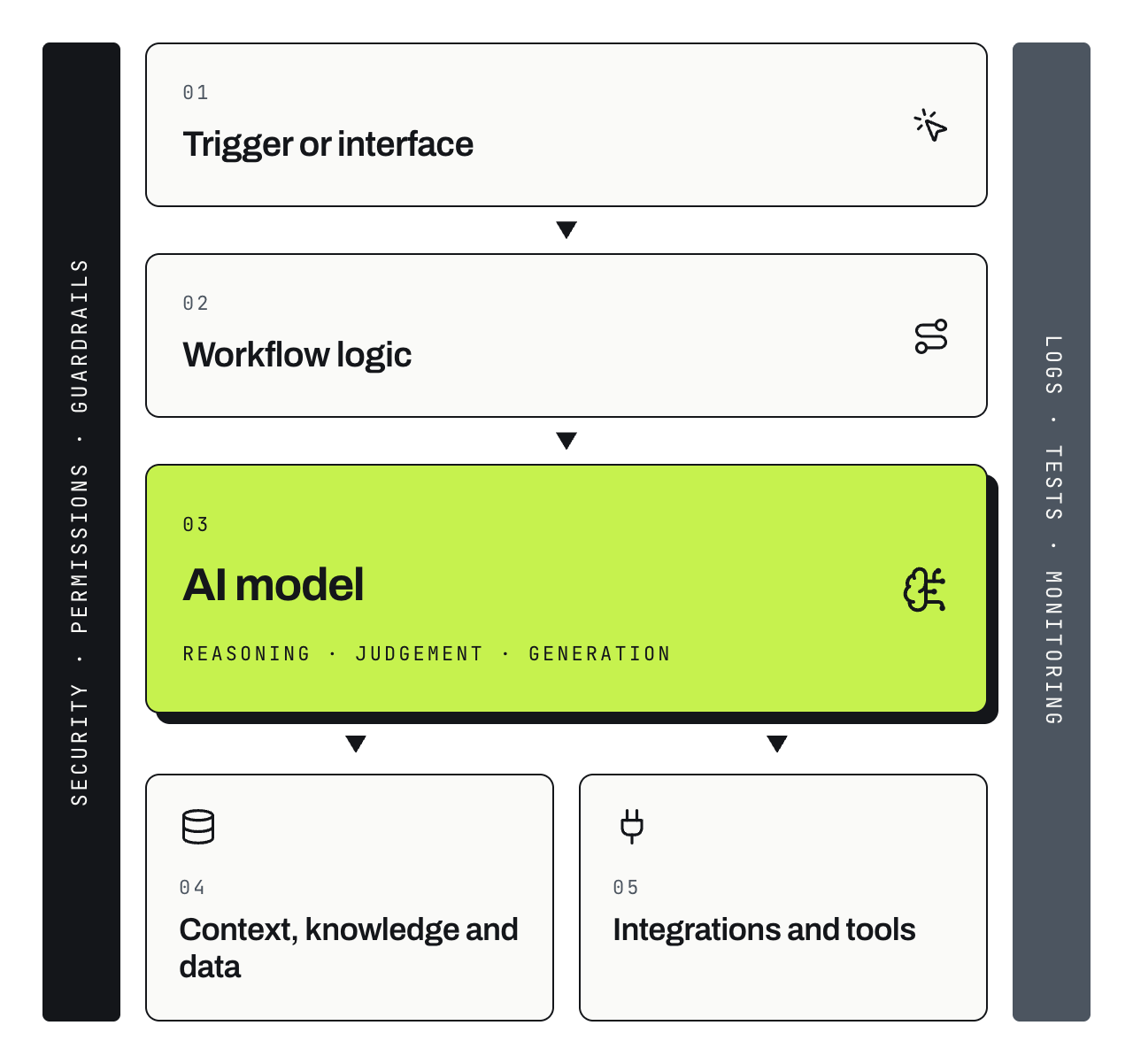
At a high level, you are usually dealing with these parts:
A trigger or user interface - the place where the work starts
Application and workflow logic - the rules that control how the system works
AI model - the part that handles reasoning, judgement and generation
Context, knowledge and data
Integrations into external systems and the tools used through those integrations
Security, permission management and guardrails
Logs, tests and monitoring so you can see what is going on
Trigger / Interface
This could be an app, a chat interface like ChatGPT, an incoming email, a new CRM lead or an automatic schedule. Our keep-in-touch agent could run every morning or start when I ask who I should contact today.
The question is: what starts the process, and who or what is allowed to start it?
Application and workflow logic
This ties the system together: the steps, fixed rules, information flow and where the system must stop for a person.
For our keep-in-touch agent, this is where you would program things like:
Review contacts every morning.
Prioritise people I have not spoken to recently.
Search the internet for a relevant update or useful reason to make contact.
Flag people I should contact but where you can't find a good reason online.
Always ask me to approve a message before it is sent.
Update my CRM after making contact with this message after I send it.
This is also where the software decides when to use AI. Traditional software handles exact rules very well. AI is useful where the system needs judgement, classification, extraction, planning, drafting or comparison.
AI model or the Brain
An AI model like ChatGPT or Claude is asked to do a specific job inside the workflow. The application gives it instructions and context, then uses the answer, decision or tool call it returns.
For the keep-in-touch agent, the model might review conversations, search for relevant updates, work out what someone is interested in, suggest a reason to get in touch and draft a message in my voice.
The question for you is: what judgement are we trusting the model to make?
Context, Knowledge and Data
Context is what is happening in the task right now: who I spoke to, what we discussed, what they are working on and whether there is a timely reason to contact them.
Knowledge is what the system needs to know to do the task well: my relationship preferences, how often I stay in touch, my tone and the topics I avoid.
Data is the records it can use: contacts, previous conversations, CRM notes, calendar events, company updates and news.
The question is: what does this system need to know, and where will that information come from?
Integrations and tools
Integrations are how the agent reaches the rest of the world. APIs let systems talk to each other, so the agent needs them, or another reliable connection, to read from and sometimes write to contacts, CRM, email, calendar, WhatsApp and other tools.
Ask: what systems does this idea need to read from or write to, can it search the internet when that is part of the job, and can we actually connect to them?
Security, permissions and guardrails
The more useful an agent becomes, the more access it usually needs. Permissions control what people and systems can access, guardrails limit what the AI can do, and security covers credentials, data movement and abuse.
Ask: what can the agent see, what can it change, what happens if it gets something wrong and where do we need human approval?
Logging, testing and monitoring
Imagine you tell your keep-in-touch agent to review your contacts, search the internet for relevant things to make contact about, find the people you should speak to and draft messages for you to approve.

No suggestions.
An hour goes by, still no suggestions.
What happened?
Logging gives you the trail of what the system did and where it failed. Maybe the contact search failed, the internet search returned nothing useful, the CRM connection broke or the model returned something the workflow did not expect. Without logs you have to guess and check each one.
Once you fix the problem, build a test so the same issue does not sneak back in. Tests are non-negotiable in modern software. If you have a vibe coder in your team, check that they are building tests and reviewing the results.
Monitoring tells you whether the system keeps performing over time: speed, errors, cost, failed tasks, search quality, message quality or whatever matters for that system.
That is enough architecture knowledge to judge an AI idea at a high level: what has to exist around the model for this to work in the real world?
How to choose what to build
Every AI idea you move forward consumes money, time and confidence in the programme. AI can be applied to almost anything, so you need a way to filter the ideas.
A meticulously organised downloads folder is nice. I am not sure anyone should build a transformation programme around it.
The way I would work through an idea is:
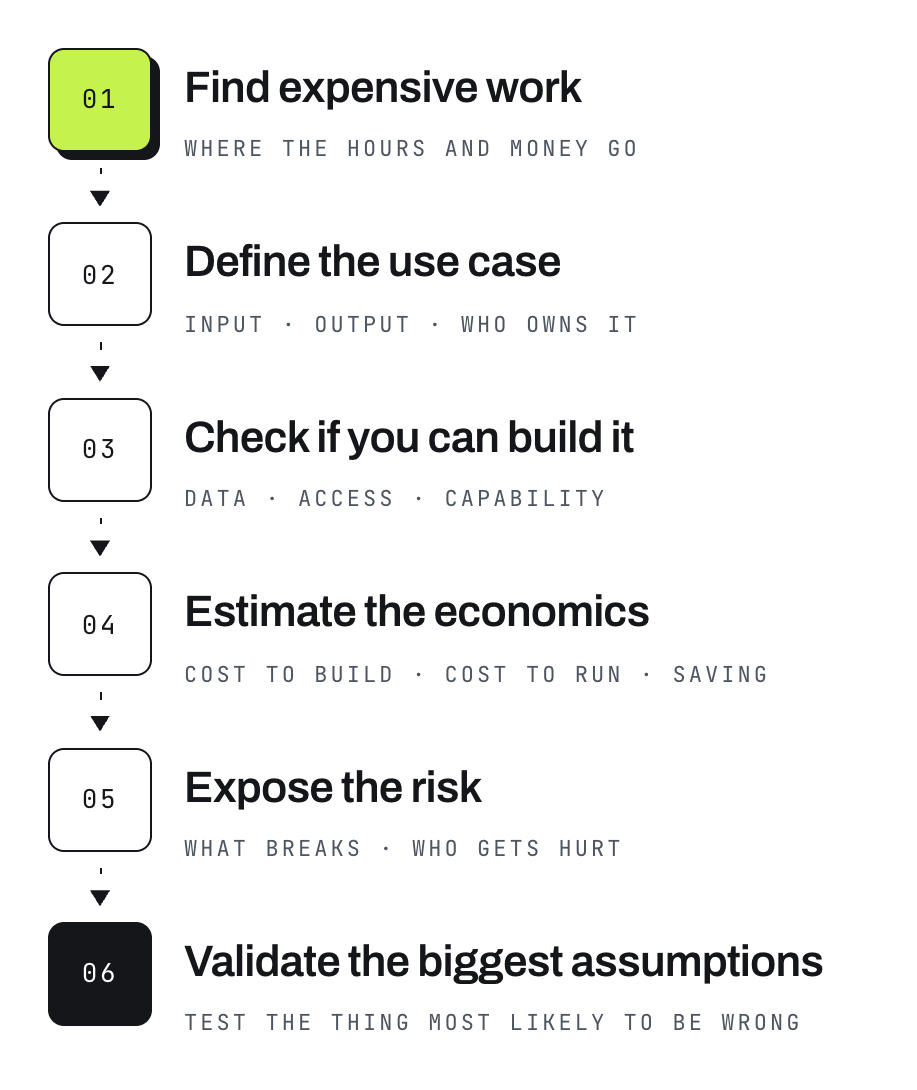
1. Find expensive work
Put the AI ideas you already have into the “AI Use Case Ranking” spreadsheet (reply “Yes” to this email to get it if you don't have it already), then look across the work your team does for things that are:
repetitive or high-volume
slow or stuck at hand-offs
dependent on people searching for information
inconsistent in quality
reliant on knowledge held by a few people
creating errors or rework
consuming expensive human time
limiting revenue or capacity
In our keep-in-touch example, sending the message is easy. The expensive work sits around it: who should I contact, when, what are they interested in, what happened recently, what could I tell them that is useful, and what did we discuss last time?
2. Define the problem and the use case
For each piece of work you want to explore, capture this sequence:
Current process
Problem statement
Desired outcome
What you think AI could do to help
What will it do?
What will it need to do that?
What is the output?
Circulate it amongst the team for their input
For the keep-in-touch example, keeping a large network warm takes remembering, researching and drafting. So the use case could be: every morning, identify who I should contact, find something relevant about them or their company, give me five useful talking points, draft a message and give me a WhatsApp deep link.
3. Check if you can actually build it
Now use the architecture map from the first half of this edition.
What starts the workflow?
What systems does it need access to?
Can it search the internet?
What data and context does it need?
Can you get that information?
What can the AI decide by itself?
Where does a person need to approve something?
Can the system actually take the actions you want it to take?
This is where a cool idea can get canned very quickly, which is useful. Finding out now is much cheaper than finding out after someone has spent six weeks building it.
4. Work out if it is worth doing
A cool AI use case that does not generate value is cool but useless. Money gives us a common way to compare very different ideas, so the “AI Use Case Ranking” spreadsheet asks three basic questions:
Does this bring in new revenue?
Does it reduce a real cost?
Does it save time?
Time savings are trickier. Saving an hour does not automatically save an hour of salary because you’re still paying the same person. The value comes from what they can do with that hour, or whether the business can increase capacity without adding people.
From there you can estimate net value and payback and compare one use case against another.
5. Expose the risk
We are going to cover AI risk, security and privacy in depth in a future edition. For now, at least ask:
What happens if the AI gets this wrong?
What sensitive or personal information has to be passed into the system for it to do the task?
Are we sharing company IP or high-value internal knowledge (DOK 3 and 4)?
What privacy and data controls have we turned on?
Could the way we use AI affect our ability to protect IP in this specific situation?
What can the AI access or change, and where do we need approval?
The answer depends on the use case, data, tools and countries you operate in. Expose the risk early enough to make a sensible decision about it.
6. Validate the biggest assumptions
Before you fund the whole thing, work out what has to be true and test the riskiest assumptions as cheaply as you can.
If the use case only works if a system has an API, check that first.
If the value depends on saving two hours per person every week, measure how long the task takes today.
If the team has to approve AI-written messages before they go out, test that process with five people before you build an entire platform around it.
If the value depends on finding useful reasons to make contact through internet research, test whether the searches consistently produce relevant, trustworthy information.
The market and the actual work will teach you faster than the whiteboard ever will.
Why we chose the keep-in-touch agent as the learning project
The keep-in-touch agent is easy to understand and useful to anyone who values an engaged network.
If you do not see value in that and you are reading this newsletter, please reach out to your nearest doctor to have your temperature checked.
Just kidding.
But seriously, a disengaged network is not very valuable.
What you go do now
Map every AI use case you can think of into the AI Use Case Ranking spreadsheet. If you do not have it yet, reply “Yes” to this email.
Pick one use case and run it through the full sequence: problem, feasibility, economics, risk and biggest assumptions.
Run the same exercise with your team so you start building a proper list of opportunities in your area.
Add the financial estimates and use the ranking to decide which ideas deserve more work.
If you get stuck while doing it, reply and ask me. I promise to reply to all that I get.
Next week we start building the keep-in-touch agent. I will do the technical build so you can see what a real agent looks like under the hood.
Then I will show you how to get similar results in under an hour using Copilot, ChatGPT, Claude or whatever chat-based LLM you use that can access the internet. It's gonna be fun!
Whats happened this week
OpenAI publishes a Navier-Stokes solution - The Navier-Stokes equations describe fluid motion and show up all over engineering, from aircraft to pumps and turbines. OpenAI says an internal system produced a proof addressing the famous existence and smoothness problem, using a group involving on the order of 10,000 concurrent agents. That proof will still get a lot of external scrutiny, but the part I find interesting is the scale of coordination. Thousands of AI agents working together on one hard problem is a very different picture from one person chatting to one model.
AI extinction warnings from Anthropic researchers - Researcher Jacob Coxon resigned from Anthropic and warned that frontier AI labs are moving too quickly towards systems that could eventually improve themselves. Anthropic Alignment Science lead Evan Hubinger then said his personal estimate is greater than a 10% chance that AI could kill humanity within the next decade. Both have been clear that current models are not the main thing they are worried about. Their concern is what happens if much more capable systems can improve themselves faster than we can control them. Whatever probability you personally put on that, people building these systems are taking the risk seriously.
An AI-designed drug showed an interesting ageing signal - Rentosertib, a drug discovered by Insilico Medicine using AI and being developed for idiopathic pulmonary fibrosis, was analysed using six different protein-based ageing clocks. In a study using data from 42 trial participants, the researchers saw younger predicted biological ages in some treatment groups, with the strongest signal around week four. This is early research and it does not prove the drug reverses ageing. The interesting bit for me is that an AI-discovered drug may be showing effects beyond the original problem it was designed to treat. We are going to see more examples where AI helps search very large solution spaces that would take humans forever to work through manually.
Get the next one
Subscribe freeFree. One edition a week. Unsubscribe in one click.