Design comes first
Use the AI System Design Canvas to define the business requirements of what the system should achieve, understand, decide and do before you start building.
On this page (25)
- AI Voice is crazy cool
- That awkward message you eventually have to send
- What the final KIT tool looks like
- The prototype we will build together
- The AI System Design Canvas
- 1. Outcome
- 2. People
- 3. Workflow
- 4. Triggers
- 5. Data and Context
- 6. AI Capabilities
- 7. Decisions and Actions
- 8. Rules, Exceptions and Human Control
- Never
- Requires human approval
- Ask for help
- Stop
- 9. Success
- Business result
- Work result
- Quality
- The canvas is where the real design happens
- Take action
- In the next edition
- QUICK SUMMARIES
My mind was blown this week after a long time. Before we get to that...
Apologies for this week’s edition being delayed. I got totally distracted.
AI Voice is crazy cool
I built my first voice AI. Essentially, a client had an issue and I came up with a potential prototype of a solution using real-time voice chat. If you want to listen to a recording of the conversation, click below.
Listen
Yes, this is something people already do with automated email, but voice is just so much cooler.

The impressive part is how natural the interruptions and responses feel in real time. Imagine if that voice sounded like someone you know. It would be hard to tell if it was a bot, so how would you know when it is someone you have never spoken to before?
Anyway, the spoken words were not that impressive because I did not spend much time on the prompting.
What crazy voice apps can you think of? Because I can think of quite a few:
Never get stood up for a meeting again.
Better customer engagement when you need to collect things like proof of residence. Which documents can I send again?
Making sure customers remember to do important things.
So, talking about prototypes, let’s look at the AI tool we are going to design together.
That awkward message you eventually have to send
You know that feeling when you realise you need to contact someone to ask them for something, then you remember you have not spoken to them in a very long time?
Now you have to send the awkward message.
‘Hey, I know I have disappeared for nine months, but can you please help me?’
Nothing says ‘valued relationship’ like appearing after nine months with a request.
KIT exists to help avoid that situation.
Its outcome is simple: maintain important relationships by finding genuine, useful reasons to start conversations before you need something from the person.
Relationships take work. The same applies to business relationships. I have been an entrepreneur for 10 years and this has always been true. When you maintain the important relationships around you, unbelievable things can happen.
The actual work is easy but finding the time and remembering to do it consistently are the problems.
What the final KIT tool looks like
Before we design the prototype, I want to show you the full tool I am working towards. This matters because the prototype will look much simpler and that simplicity is deliberate.
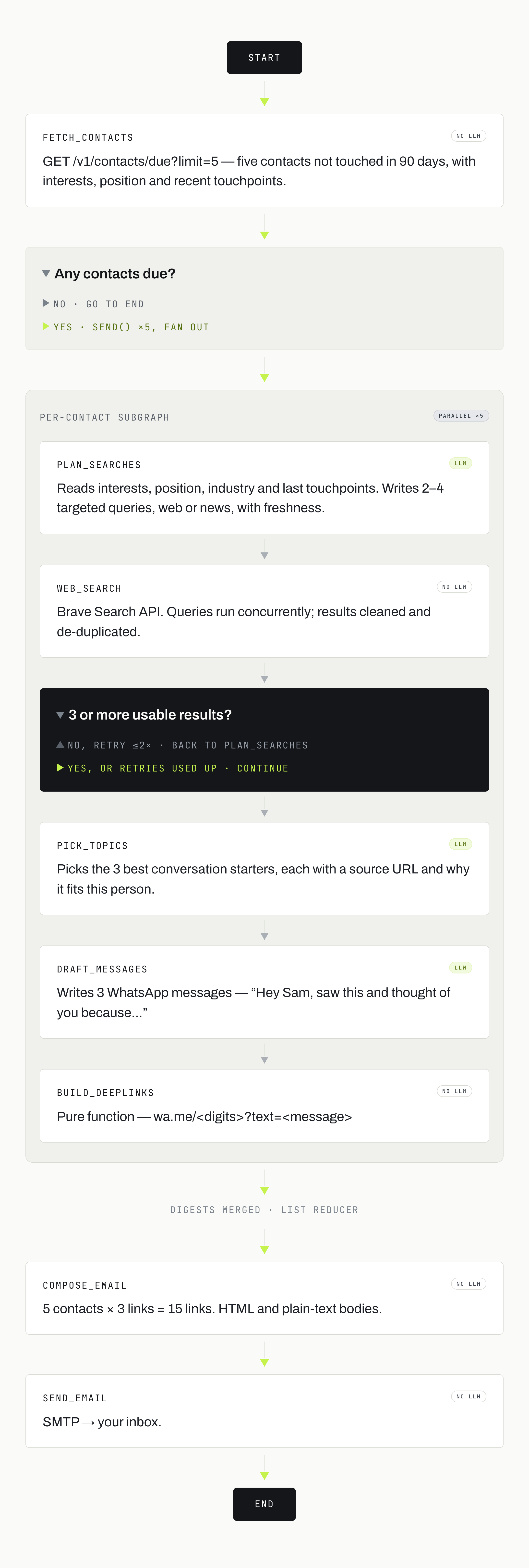
My completed version of KIT will run as an automated agent built with LangGraph and connected to my CRM.
An API will provide five people and the relevant information about each relationship. KIT does not need to decide who should be contacted. That decision has already been made before the agent receives the data.
For each of those five people, the agent will:
Read the information provided about the relationship and the person’s interests.
Search the web for recent developments connected to those interests.
Judge whether each result is strong enough to justify starting a conversation.
Loop to keep searching when a result is weak.
Return no recommendation when nothing is worth sending.
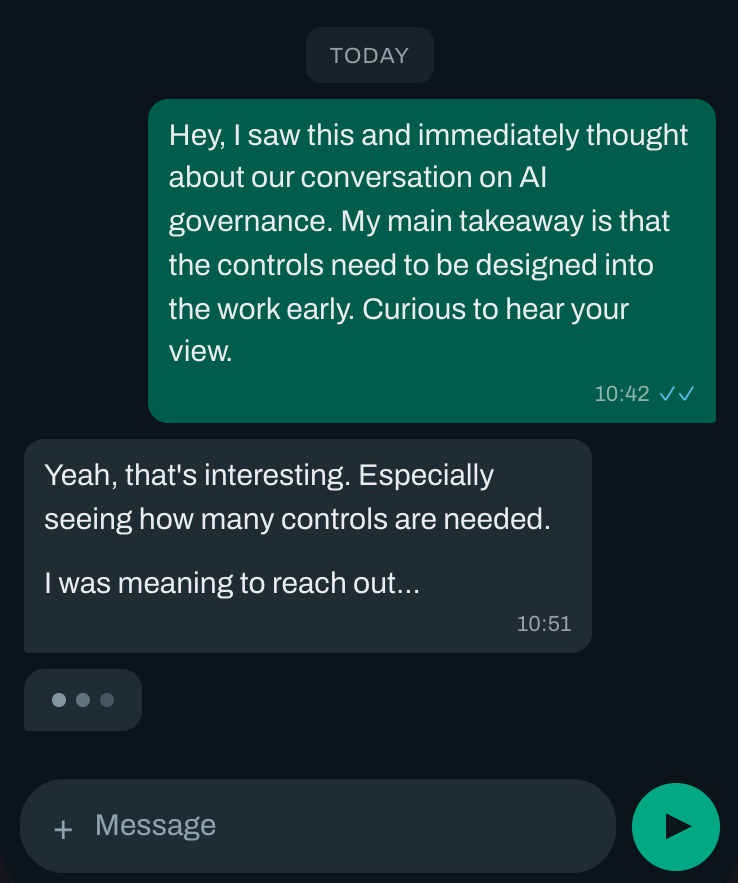
Draft a short WhatsApp message for every approved result.
Turn each message into a WhatsApp deep link.
Email the links to me so I can review and send the messages.
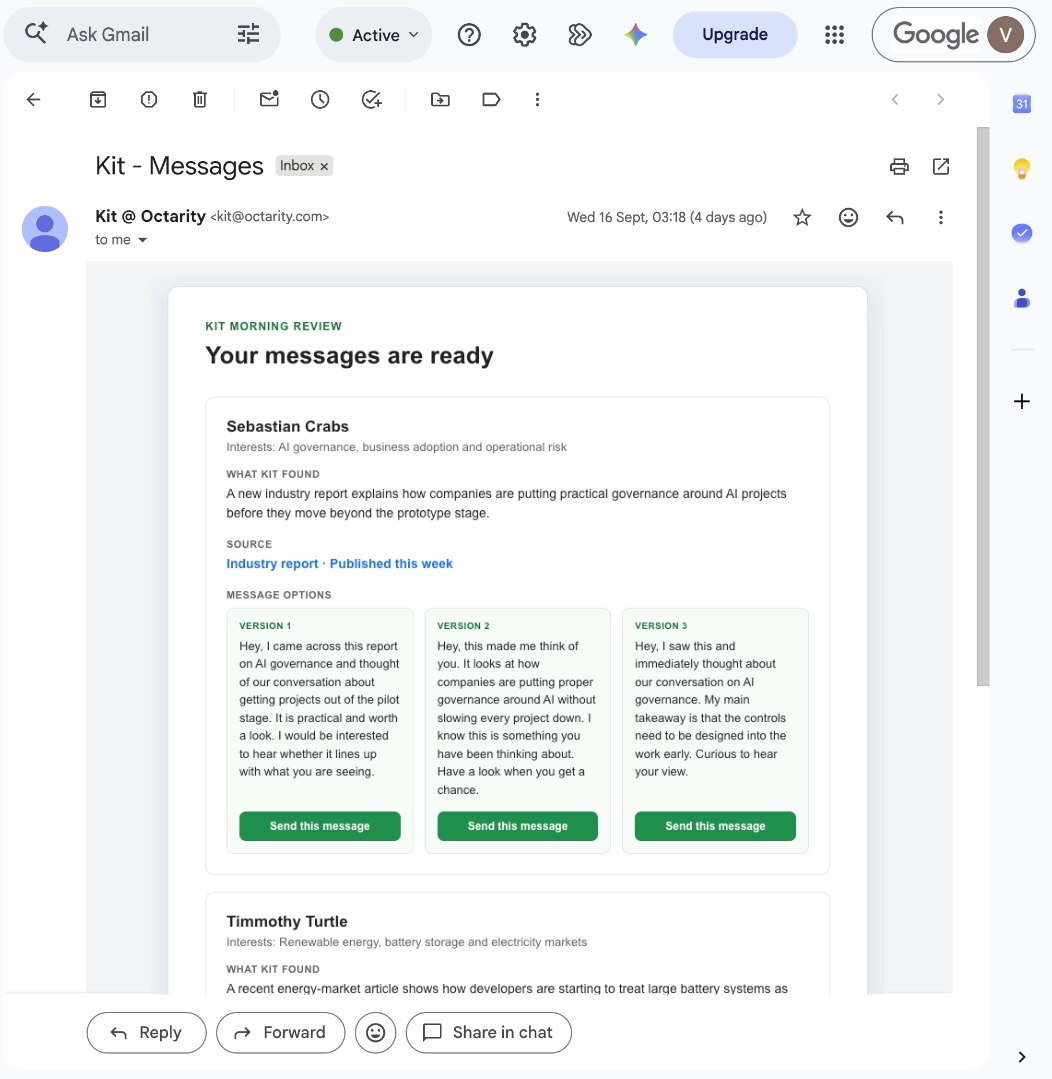
The agent uses tools to access data, search the web and update records. It also keeps state, so it can continue a run if something stops halfway through. The workflow is split into nodes, with each node responsible for one part of the job.
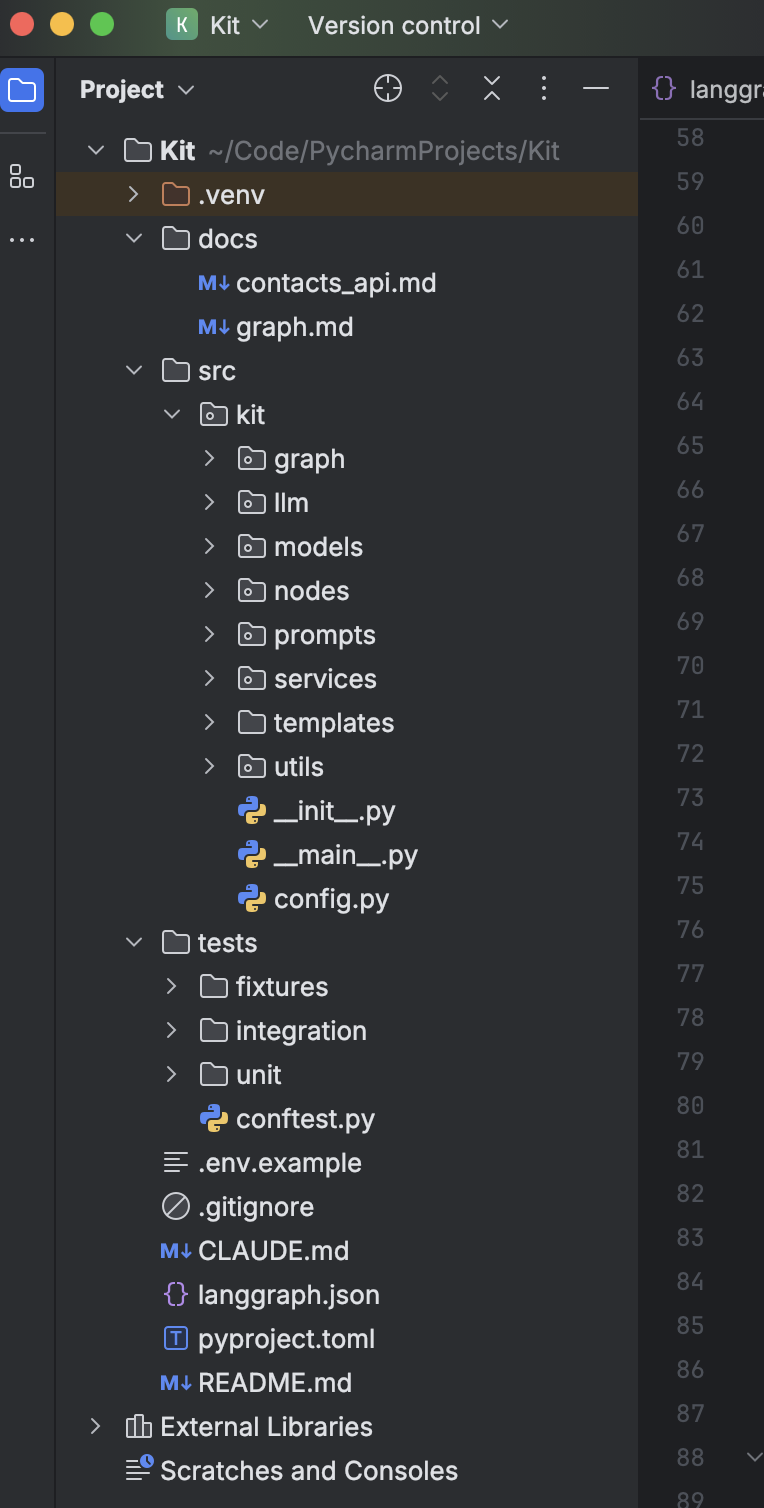
Underneath all of that, is still just code calling LLMs with instructions. This is what the code for a custom agent looks like.
The important work happens before the code: deciding what the system should achieve, what it needs to know, which judgements it may make and where I still need to be involved.
The prototype we will build together
The version you will build in the next edition removes the CRM, API, scheduled run, email delivery and LangGraph code.
You will manually add five people and their information to a spreadsheet. You will upload that spreadsheet to ChatGPT, Claude, Copilot or another chat LLM, then paste in a prompt that runs the research and message-writing workflow.
That manual spreadsheet means the prototype has no reason to decide who should be contacted. You have already made that decision by choosing the five people you add to the sheet.
The full tool works the same way. Its API supplies the five people and their data. The agent starts working from there.
So the prototype can focus on the parts we actually need to learn about:
Does the research produce results worth starting a conversation about?
Can the AI recognise when a search result is too weak?
Do the drafted messages sound human?
Would I genuinely send them?
Does the output include enough information for me to review it quickly?
What happens when nothing good is found?
This is the change in thinking that matters. A prototype does not need to be a tiny copy of the final technical system. It needs to test the important unknowns.
For KIT, the CRM connection is normal software work. The difficult part is deciding whether a piece of research gives me a genuine reason to contact someone, then turning that into a message I would be happy to actually send.
That is what we need to design first.
The AI System Design Canvas
Too many people start an AI project by talking about models, agents, APIs, RAG, vector databases and whichever new tool appeared on LinkedIn that morning.
That is too early.
We first need to define what the business needs the solution to achieve, understand, decide and do. The AI System Design Canvas gives us nine blocks for doing that:
Outcome
People
Workflow
Triggers
Data and Context
AI Capabilities
Decisions and Actions
Rules, Exceptions and Human Control
Success
I have used KIT as the worked example below. You will also be able to download a blank copy and use it for your own AI solution.
1. Outcome
The first question is: what business result are we trying to create?
‘Build a keep-in-touch agent’ describes a type of technology. It does not tell us why the tool should exist.
KIT’s outcome is:
Maintain important relationships by creating genuine reasons to reconnect regularly, so I do not only contact people when I suddenly need something from them.
That outcome gives the rest of the design something to serve. If a feature does not help maintain the relationship, it probably does not belong in KIT.
It also changes how we judge the system. Sending more messages is not the outcome. Starting worthwhile conversations and keeping important relationships warm is the outcome.
2. People
The second block asks who is involved in the solution.
For KIT, there are two important people:
Me, the user who reviews the research and decides whether to send a message.
The contact, who receives the message and may continue the conversation.
In a company version, you might also have an account manager who owns the relationship, a sales manager who needs visibility or someone who approves certain types of communication.
The people block matters because ‘send a message’ is not the end of the process. Someone has to review the recommendation, send it, deal with the reply and continue the relationship.
If five messages create three conversations, those conversations become real work and take considerable time. That is why my version only processes five people at a time. Five is enough to keep the process moving without turning the entire day into relationship maintenance. Turns out ‘keeping in touch’ is a sneaky way of creating more WhatsApp admin.
3. Workflow
The workflow describes how the work should happen from beginning to end.
The full KIT workflow is:
An API provides five people and their relationship data.
KIT reads each person’s interests and context.
KIT searches for recent, relevant developments.
KIT judges whether the findings are strong enough to start a conversation.
KIT drafts messages for the approved findings.
KIT creates WhatsApp deep links.
KIT emails the results to me.
I review the research and messages.
I choose which messages to send.
I handle any conversations that follow.
The prototype workflow is shorter:
I manually add five people to the spreadsheet.
I upload the spreadsheet and prompt to a chat LLM.
The LLM researches, judges and drafts.
I review the output.
I click the links for the messages worth sending.
Both workflows test the same important judgement. The prototype simply uses a person to perform the surrounding software steps.
4. Triggers
A trigger defines when the solution should start working.
For the prototype, the trigger is manual: I upload the completed spreadsheet and ask the LLM to run the workflow.
For the full tool, the trigger will be scheduled. At the set time, the API provides the next five people and the agent starts its work.
This is another place where the system does not need to make a decision. KIT does not decide whether someone is due for contact. It receives a prepared batch of five people.
That boundary is important. If another system already makes a decision reliably, there is no reason to ask the AI to make it again.
5. Data and Context
The next question is: what would a capable person need to know to do this work well?
The prototype starts with four pieces of information for each person:
Name
WhatsApp phone number
Last contact date
Interest
The reader manually enters this information, so they control who is included and what KIT knows about them.
The full tool can receive richer context from the API, such as:
The nature of the relationship
Conversation history
Topics or projects previously discussed
Business interests
Industry and position
Outstanding promises
Useful personal or professional notes
More context can improve the recommendation. It also creates more opportunities for bad, incomplete or sensitive data to affect the result. We need to decide which information is essential, which information merely helps and which information should stay out of the system.
For the first prototype, the four spreadsheet fields are enough to test the core idea.
6. AI Capabilities
An AI capability is one clear piece of intelligent work. ‘Manage my relationships’ is far too vague.
KIT needs to:
Understand the person’s interests.
Find recent developments connected to those interests.
Check the source and publication date.
Judge whether the development is significant enough to discuss.
Explain why the finding is relevant to this person.
Draft a short, natural WhatsApp message.
Create the final WhatsApp deep link.
Explain when information is missing or uncertain.
One job per line makes the system easier to design, test and improve. If the research is poor while the messages are good, we know which capability needs work.
7. Decisions and Actions
This block defines what the AI may recommend, decide and do.
For KIT, the important decision concerns the quality of the research result.
Every person is already someone I want to maintain a relationship with. KIT needs to decide whether it has found a strong enough reason to contact them today.
It can make four decisions:
Use this result: the finding is recent, credible, relevant and worth having an opinion about.
Keep searching: the result is related to the interest, but it is too generic, obvious, old or weak.
No worthwhile result: the search has finished and nothing is strong enough to justify a message.
Ask me: essential information is missing or unclear.
KIT may then perform these actions:
Draft a message for an approved result.
Create the WhatsApp deep link.
Include the source, date and reason for recommending it.
Deliver the recommendation for human review.
KIT does not send the WhatsApp message. I make the final decision because I own the relationship and I will have to deal with the conversation that follows. If this starts a three-hour conversation, the agent will not be handling that part for me.
8. Rules, Exceptions and Human Control
Good AI design includes clear ways to stop.
KIT follows these rules:
Never
Never invent a fact, source, publication date or personal detail.
Never create a message simply to fill the requested number of results.
Never guess a missing country code.
Never send a WhatsApp message automatically.
Requires human approval
Every message must be reviewed before it is sent.
The user decides whether the finding is appropriate for the relationship.
The user can edit or reject any drafted message.
Ask for help
Ask when an interest is too vague to research properly.
Ask when the phone number cannot be used confidently.
Ask when the available information creates uncertainty that changes the recommendation.
Stop
Stop searching after the agreed number of focused attempts.
Return ‘No worthwhile result’ when nothing meets the standard.
The ability to return nothing is important. If we force KIT to produce three ideas every time, it will eventually give us three bad ideas with a lot of confidence.
9. Success
The final block asks how we will know KIT is working.
We need to measure three things.
Business result
Important relationships receive useful, consistent attention.
Fewer relationships are only activated when I need help.
More recommendations lead to genuine conversations.
Work result
I spend less time searching for a reason to reconnect.
I can review a batch of five recommendations quickly.
The workflow is manageable alongside the conversations it creates.
Quality
The research is recent, credible and relevant.
The message gives the recipient something worth responding to.
The connection to the person feels natural.
I would genuinely send the message with little or no rewriting.
KIT returns no result when the available options are weak.
The core quality test is simple:
If I received this message, would the development itself give me something worth responding to?
If the answer is no, the result is not good enough.
The canvas is where the real design happens
This is the value of thinking the system through before building it.
The final LangGraph agent will have more code, integrations and automation than the prototype. The business design stays the same:
The same outcome
The same people
The same core workflow
The same judgement about research quality
The same rules
The same human approval point
The same definition of success
The technology changes how the work is executed. The canvas defines what the work is supposed to achieve.
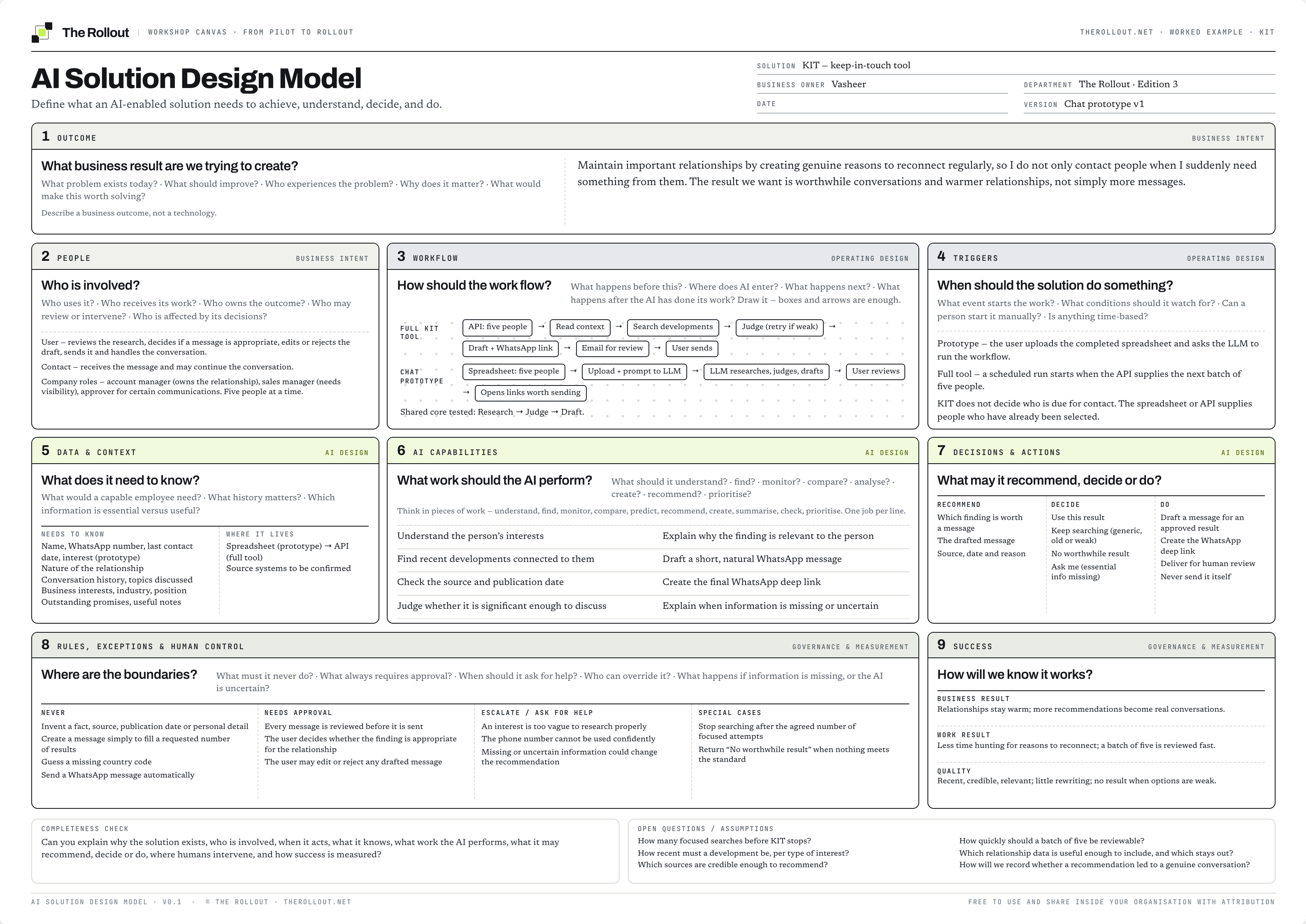
Take action
Download the AI System Design Canvas and use it for one AI idea you are considering.
Work through the nine blocks in order:
Define the outcome.
Identify the people involved.
Map the workflow.
Define the triggers.
List the data and context required.
Break the intelligent work into capabilities.
Set the decisions and actions.
Define the rules and human controls.
Decide how success will be measured.
Keep any unresolved issues under ‘Open questions and assumptions’. A visible gap is much more useful than an invented answer.
Download the Free AI Solution Design Assets
In the next edition
We have now designed KIT. In the next edition, we will build and run the prototype.
You will get:
The KIT spreadsheet template
The complete KIT prompt
Instructions for running it in ChatGPT, Claude or Copilot
A simple way to review the research and messages
A process for improving the prompt after each test
Then we will compare the manual prototype with the full LangGraph agent and look at which parts are worth automating.
QUICK SUMMARIES
Whats happened this week
Can anyone actually slow the AI race: Dario Amodei wants frontier labs to slow capability development so safety work can catch up. Trump and Jensen Huang’s response was basically: absolutely not. I understand why. Better models mean more revenue and commercial advantage. For your company, assume capability will keep moving quickly. Build systems that can swap models, test outputs and keep humans in control of consequential decisions.
Robots are starting to carry skills into new environments: Figure tested Helix 2.5 in 30 homes it had never seen. The robot tidied rooms, folded towels and made beds without collecting data or adapting inside those homes. Broad pretraining increased zero-shot success from 9% to 56%. The important development is generalisation: physical AI is starting to carry learned skills into new environments instead of being rebuilt for every location.
Tools from this edition
Get the next one
Subscribe freeFree. One edition a week. Unsubscribe in one click.